Convert Excel to JPG | Learn XLS to JPG Conversion in C# .NET
Excel files are widely used for data entry, management, accounting, and financial analysis, containing numbers, formulas, text, and shapes. The XLSB format is an Excel Binary Workbook that stores information in binary rather than XML. To view XLSB files you need applications like Microsoft Excel Online, Apache OpenOffice Calc, or LibreOffice Calc. This article explains how to convert XLSB to JPG using a REST API.
The three most common general uses for spreadsheet software are to create budgets, produce graphs and charts, and for storing and sorting data. Within business spreadsheet software is used to forecast future performance, calculate tax, completing basic payroll, producing charts, and calculating revenues.
Excel Conversion API
Aspose.Cells Cloud is our amazing API providing the capabilities to seamlessly enhance your native, web & cloud apps to provide spreadsheet processing functionality. Implement the feature to view, modify and convert Microsoft Excel & OpenOffice spreadsheets to other supported file formats. We are going to use Aspose.Cells Cloud SDK for .NET to convert Excel to JPG in C# .NET application. The SDK is available for download at NuGet and GitHub. Please execute the following command in the terminal window to perform the installation for NuGet:
nuget install Aspose.Cells-Cloud
When using .NET CLI:
dotnet add package Aspose.Cells-Cloud
Package Manager Console
If you are using Visual Studio, then the package can also be installed using the Package Manager Console. Please execute the following command:
PM> Install-Package Aspose.Cells-Cloud
Now we need to create an account by visiting Aspose.Cloud dashboard, where we can use GitHub or Google account, or Sign Up using create a new account button.
XLSB to JPG in C#
Please follow the steps given below to perform the conversion:
- First, create an instance of CellsApi and pass your ClientID and ClientSecret.
- Next, define string variables for the input file, the output file name, and the desired output format.
- Then, set integer values for the horizontal and vertical resolutions of the resulting image.
- Load the XLSB file using
File.OpenRead. - Initialize the conversion with the
CellsWorksheetsGetWorksheet(...)method, which returns a stream. - Finally, use
File.Createto save the stream to disk via the saveToDisk(…) method.
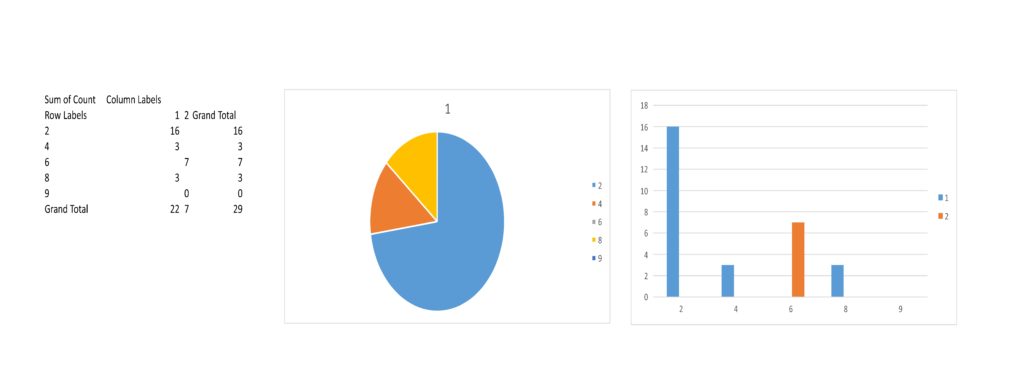
Image 1:- Preview of the resultant image.
The sample file used in the above example can be downloaded from TestCase.xlsb.
Convert Excel to JPG using cURL
Because Aspose.Cells Cloud follows a REST architecture, you can also perform the conversion with cURL commands. First, generate a JWT access token using your Client ID and Client Secret from the Aspose.Cloud dashboard:
curl -v "https://api.aspose.cloud/connect/token" \
 -X POST \
 -d "grant_type=client_credentials&client_id=4db2f826-bf9c-42e7-8b2a-8cbca2d15553&client_secret=d757548a9f2558c39c2feebdf85b4c44" \
 -H "Content-Type: application/x-www-form-urlencoded" \
 -H "Accept: application/json"
Then run the conversion request. The file must already be stored in cloud storage; the response contains the JPG image, which you can save locally:
curl -v -X GET "https://api.aspose.cloud/v3.0/cells/TestCase.xlsb/worksheets/Sheet2?format=JPEG&verticalResolution=800&horizontalResolution=600" \
-H  "accept: application/json" \
-H  "authorization: Bearer <JWT Token>" \
-o myNewConverted.jpeg
Conclusion
In this article we covered how to convert an XLSB workbook to a JPG image using both C# code and cURL commands with Aspose.Cells Cloud. You can also explore the API through the OpenAPI Specification directly in a browser.
Our SDKs are open source under the MIT license, free to use and customize. The full source code is available on GitHub. If you encounter any issues or have questions, please visit our free customer support forum.
Related Articles
We also recommend visiting the following links to learn more about
- How to handle Conditional formatting in Excel using REST API
- Sparklines in Excel manipulation using Free Cloud API
- Manipulate Pivot tables in Excel and Cloud storage utilization using Aspose.Cells Cloud API
- [Manipulate Excel cells formatting using Cloud API][19]