Microsoft Word’s mail merge is a powerful feature that lets you create personalized letters, labels, or envelopes from a single template. Instead of manually editing each document, mail merge automates the process, saving time and reducing errors. Key benefits include:
- Rapidly generate thousands of personalized letters.
- Easy proofreading—edit the template once.
- Target recipients based on specific criteria.
- Reuse a standard letter for future campaigns.
- Add personal touches for each recipient.
- Use a single data source repeatedly, minimizing mistakes.
Recognizing its importance, Aspose.Words Cloud fully supports Mail Merge. The API lets you personalize letters using a recipient’s name, and it accepts data sources such as lists, spreadsheets, or databases. This post explains how to populate a Mail Merge or mustache template with data using PHP.
MailMerge using Template
To perform a Mail Merge, you need a Word template and a data file. These two inputs are passed to the ExecuteMailMergeOnline endpoint.
cRUL command
curl -X PUT "https://api.aspose.cloud/v4.0/words/MailMerge?withRegions=false&documentFileName=template" -H "accept: application/octet-stream" -H "Authorization: Bearer <JWT Token>" -H "Content-Type: multipart/form-data" -H "x-aspose-client: Containerize.Swagger" -d {"Template":{},"Data":{}}
Request URL
https://api.aspose.cloud/v4.0/words/MailMerge?withRegions=false&documentFileName=template
PHP
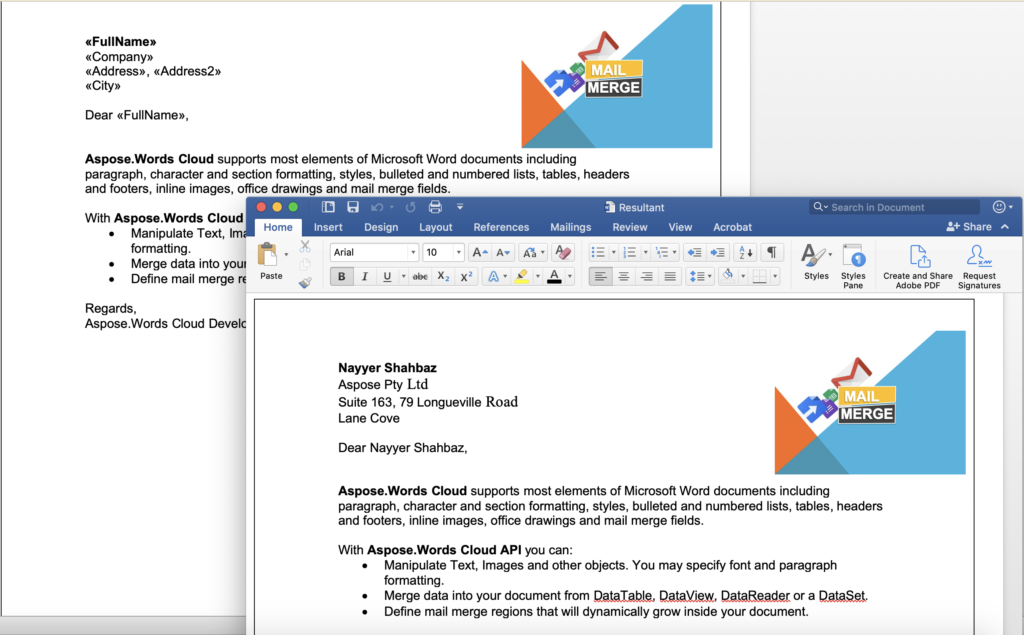
Fig 1:- Preview of MailMerge operation.
Insert HTML during Mail Merge
Beyond plain text, the API can insert HTML content into Mail Merge fields. The ExecuteMailMerge endpoint lets you embed HTML tables, images, or styled text directly in the output document. The example below demonstrates inserting an HTML table and an image, then saving the result to cloud storage.
cURL command
curl -X PUT "https://api.aspose.cloud/v4.0/words/template.doc/MailMerge?withRegions=false&mailMergeDataFile=TestExecuteMailMergeData%20%281%29.txt&useWholeParagraphAsRegion=true" -H "accept: application/json" -H "Authorization: Bearer <JWT Token>" -H "Content-Type: multipart/form-data" -H "x-aspose-client: Containerize.Swagger" -d {"data":""}
Request URL
https://api.aspose.cloud/v4.0/words/template.doc/MailMerge?withRegions=false&mailMergeDataFile=TestExecuteMailMergeData%20%281%29.txt&useWholeParagraphAsRegion=true
PHP
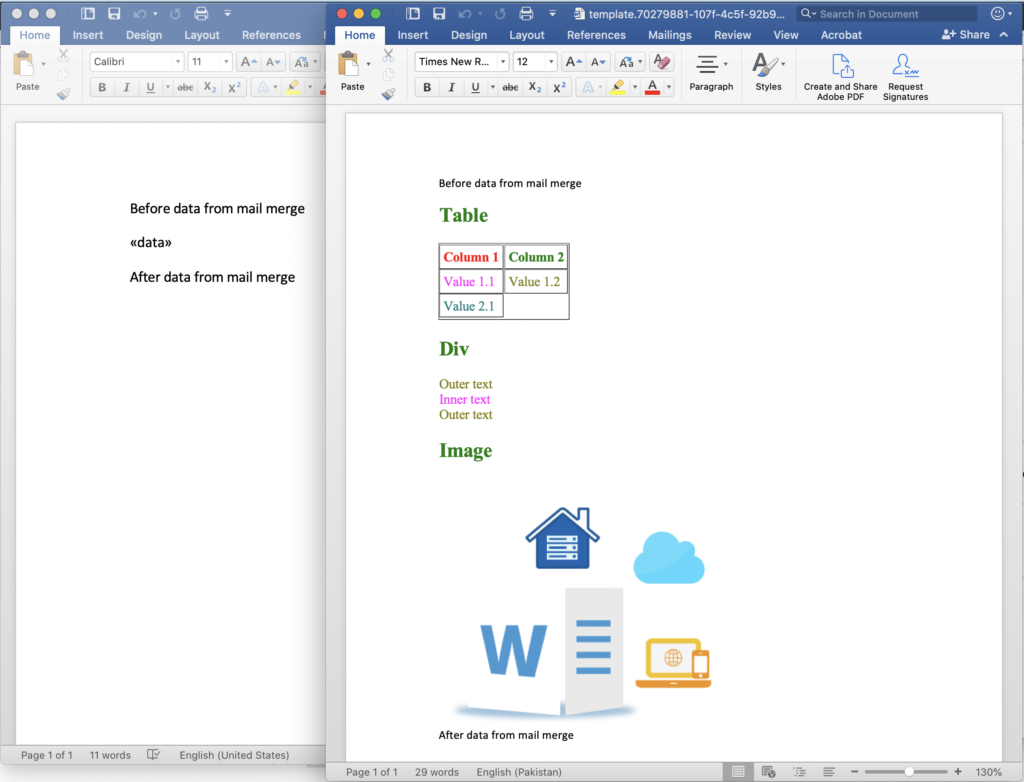
Fig 2:- Mail Merge after HTML insert.
Conclusion
This article covered how to execute Mail Merge using the Aspose.Words Cloud PHP SDK. We explored merging with a template and inserting HTML content into merge fields. The SDK is open‑source under the MIT license and available on GitHub. If you encounter any issues, reach out via the free product support forum.
Related Articles
We also recommend visiting the following links to learn more about: