XML to JSON Conversion in C# .NET.
The XML (Extensible Markup Language) has been a widely used format for data representation because of its flexibility and ability to handle complex structures. In contrast, JSON (JavaScript Object Notation) is popular for its simplicity, ease of use, and superior performance in web applications. Converting XML to JSON therefore improves compatibility and speed, especially for modern web services and APIs that primarily rely on JSON.
API to Change XML to JSON
Converting XML Schema (XSD) to JSON Schema can be complex, but the Aspose.Cells Cloud SDK for .NET streamlines the process. Aspose.Cells is known for powerful spreadsheet processing, and its Cloud SDK extends this capability to transform data schemas efficiently.
First, search for Aspose.Cells-Cloud in the NuGet package manager and click Add Package to include the SDK in your project. Then, obtain your client credentials from the cloud dashboard. If you don’t have an account, create a free one by following the steps in the quick start guide.
Convert XML to JSON in C#
With Aspose.Cells Cloud SDK for .NET, you can easily convert an XML Schema into a JSON Schema, ensuring your data meets the required structural and validation rules in JSON format. Below is a concise example of changing XML schema to JSON schema using C#.
CellsApi cellsInstance = new CellsApi(clientID, clientSecret);
Create an instance of the CellsApi class by providing your client credentials.
cellsInstance.UploadFile("input.xml", inputFile);
Upload the source XML file to cloud storage.
var response = cellsInstance.CellsWorkbookGetWorkbook("source.xml", null, format: "JSON", null, null, null, null, "myResultant.json", null, null);
Start the XML‑to‑JSON conversion. After a successful conversion, the resulting JSON file is saved in cloud storage.
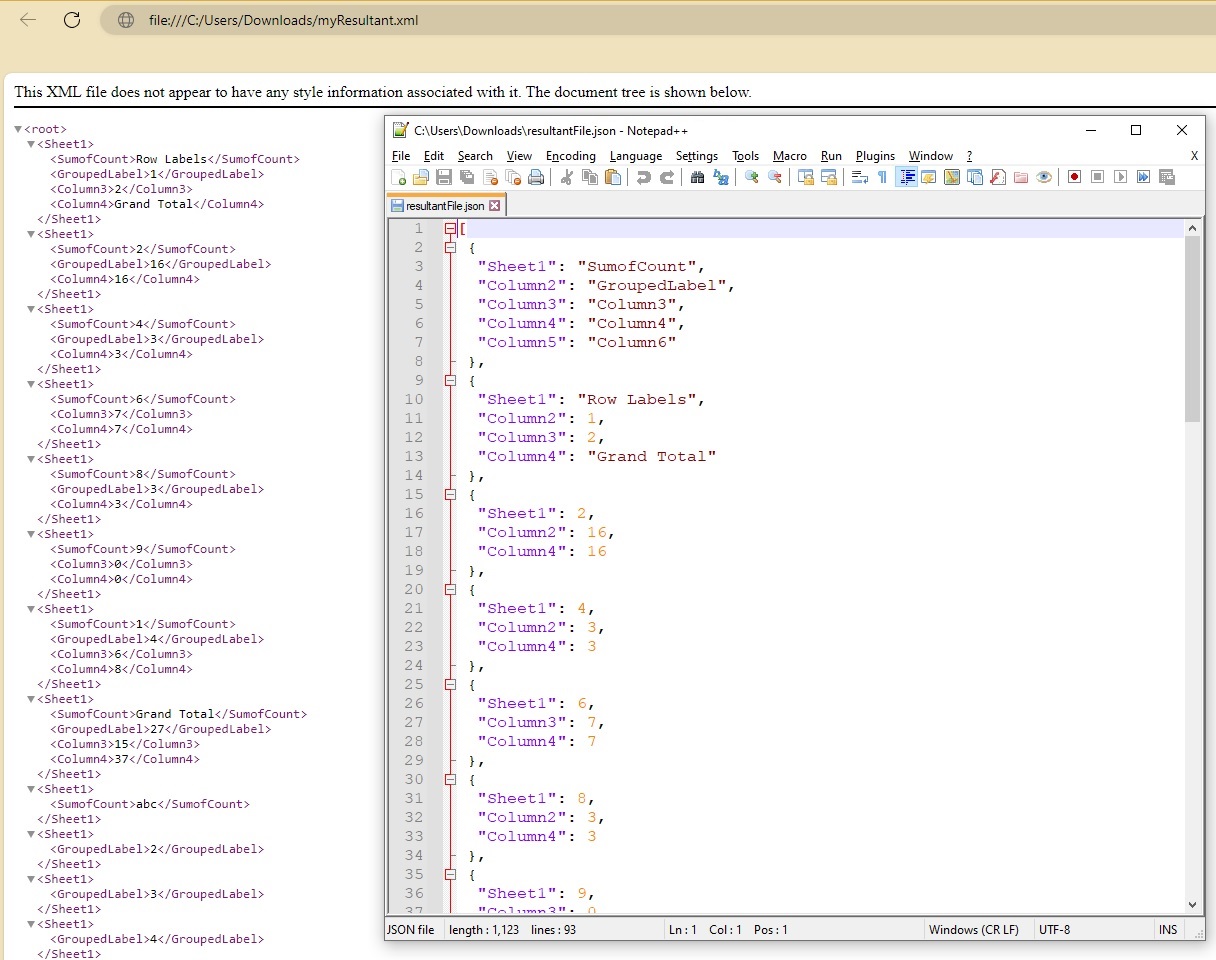
A preview of XML to JSON conversion.
Turn XML into JSON using cURL Commands
Converting XML to JSON with Aspose.Cells Cloud can be fully automated using cURL commands. This approach leverages the SDK’s ability to process complex XML structures and deliver accurate JSON output efficiently. First, generate a JWT access token using your client credentials:
curl -v "https://api.aspose.cloud/connect/token" \
 -X POST \
 -d "grant_type=client_credentials&client_id=163c02a1-fcaa-4f79-be54-33012487e783&client_secret=c71cfe618cc6c0944f8f96bdef9813ac" \
 -H "Content-Type: application/x-www-form-urlencoded" \
 -H "Accept: application/json"
After obtaining the JWT token, run the following command to export the XML schema to JSON schema. The resulting JSON is stored in cloud storage.
curl -v "https://api.aspose.cloud/v3.0/cells/{mySourceFile}?format=JSON&isAutoFit=false&onlySaveTable=false&outPath={myResultantFile}" \
-X GET \
-H "accept: application/json" \
-H "authorization: Bearer {accessToken}"
To download the resulting JSON file to your local machine, use this cURL command:
curl -v "https://api.aspose.cloud/v3.0/cells/{mySourceFile}?format=JSON&isAutoFit=false&onlySaveTable=false" \
-X GET \
-H "accept: application/json" \
-H "authorization: Bearer {accessToken}" \
-o "myResultantFile"
Replace mySourceFile with the name of the XML file in cloud storage, myResultantFile with the desired JSON filename, and {accessToken} with the JWT token generated above.
Our Free XML to JSON Conversion App
Please try our free XML to JSON Converter app. This lightweight, high‑performance tool is built on Aspose.Cells Cloud and lets you experience the SDK’s capabilities instantly.

Our free XML to JSON conversion App.
Conclusion
In conclusion, converting XML to JSON is essential for modern web applications, improving data interchange and processing efficiency. Explore the Aspose.Cells Cloud SDK to optimize your data workflows and take advantage of its powerful features. Embrace advanced data transformation to boost your application’s performance and interoperability today.
Useful Links
Related Articles
We highly recommend visiting the following blog posts for more information: